
Five minutes, one goal: know where you stand
Picture the Monday coordination meeting. It starts in five minutes, you walked in with concrete on your boots and coffee in your hand, and the super drops a three-week look-ahead on the table or throws it up on a monitor. Everyone else is already nodding like they've memorized it. You have exactly two questions that matter: what am I on the hook for, and is anything going to stop me from doing it? Everything below is about answering those two questions fast, then reading well enough to open your mouth at the right moment instead of finding out Thursday that the deck you needed poured never got poured.
Reading a look-ahead quickly isn't about speed-reading. It's about knowing where to look and in what order, so you're not scanning the whole grid like it's a word search. Do it in the same sequence every time and it becomes muscle memory. Here's the sequence I use, and the one I teach every new foreman.
First, find "today" and pin down the horizon
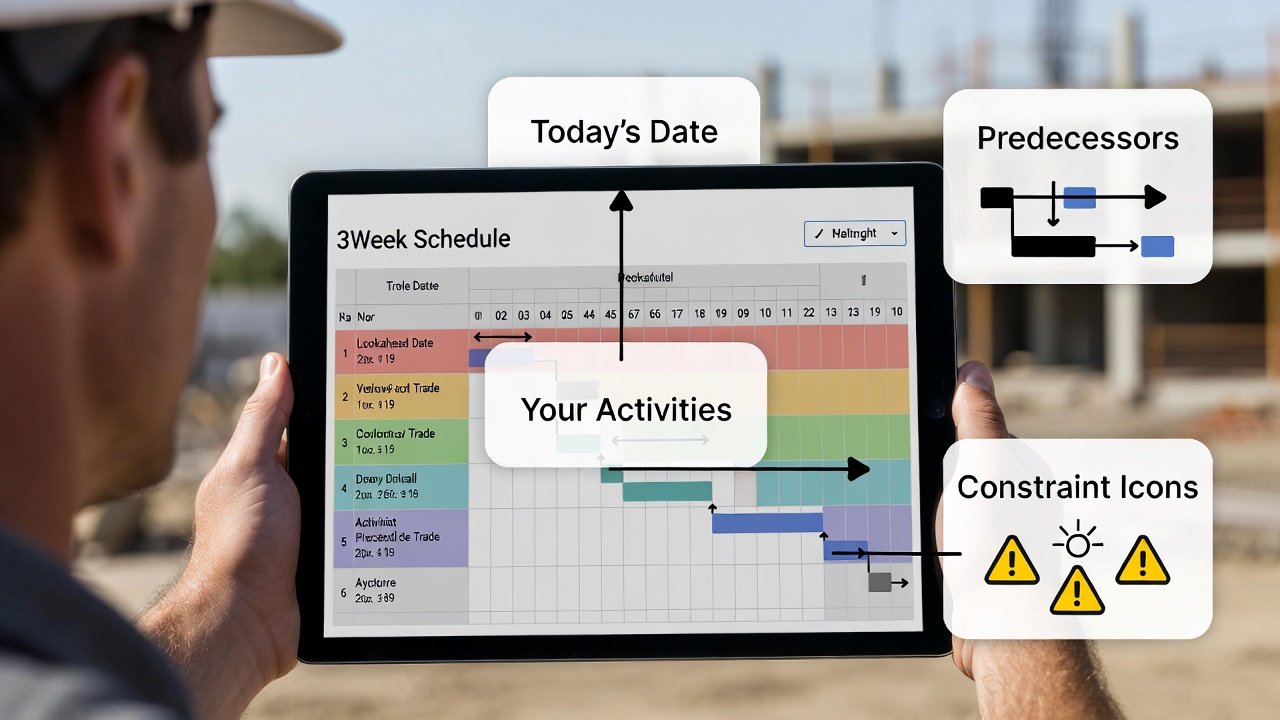
Before you read a single activity, orient. Time runs left to right, days or weeks across the top. Find the vertical line for today, or if there isn't one, find this week's column. That line is your reference point for everything else — anything to the left is committed or done, anything a column or two to the right is what you should be pulling material and manpower for right now.
Then clock the horizon. A three-week look-ahead is roughly 15 working days; a six-week is around 30. That number tells you how much runway you're being shown. On a three-week window, the work in week three is close enough that constraints on it are your problem this week — that's the whole point of short-interval scheduling. If you're looking at a six-week and something in the back half is missing a submittal, you've probably still got time. On a three-week, the same gap means someone should already be on the phone. Knowing the horizon tells you how loud to be about a problem.
Get to your work — and learn how the sheet is organized doing it
Look-aheads get organized one of two ways, and you need to know which in the first ten seconds because it changes how you read everything. Either it's grouped by trade (all the electrical rows together, all the plumbing rows together) or it's grouped by location — Level 3 East, then Level 3 West, then Level 4 — with the trades stacked inside each area.
Location-based is the better format for anyone who has to coordinate, and it's how good look-ahead tools lay it out, because construction conflicts are almost always about space, not trade. When the rows are grouped by area, you can see at a glance that framing, in-wall rough-in, and inspection are all fighting over the same 2,000 square feet in the same week — which is exactly the collision a trade-sorted sheet hides. So find your row, but while you're at it, register whether the person who built this schedule is thinking in trades or in real estate. It tells you a lot about how carefully the sequencing was done.
For each of your activities, read four things — not the description alone
Now the part everyone skips. When you land on one of your bars, don't just read the description and move on. Read four things, every time:
- What and where. "Rough-in" means nothing. "Rough-in Level 3 East, units 301–308" means something. If the location isn't in the description, hunt for the area code or find which location band the row sits in. Ninety percent of the "I didn't know that's what you meant" arguments on a jobsite are missing-location arguments.
- When it starts. Your start date is a commitment, not a suggestion. Anything starting this week is a promise you're making to the trade behind you.
- Duration. The length of the bar is somebody's assumption about your production rate. If the schedule gives you three days to pull wire on a floor your crew has historically needed five for, that gap is a fight you want to have in the meeting, not on day three when you're already behind and it looks like your fault.
- Whether it's actually shown as ready. A bar existing on the schedule does not mean the work is clear to go. That's the next two steps.
That last point is where reading a look-ahead differs from reading a bar-chart baseline. A CPM schedule tells you when work is planned. A good look-ahead is supposed to tell you when work is ready — constraints cleared, predecessor done, material on site. Reading it means checking that readiness, not just the dates.
Read up the chain: what has to finish before you start
Find the work that has to be complete before yours can begin, and ask the only question that matters about it: is it actually on track? If the sheet shows dependency lines, follow them. If it doesn't, use your head — in the same area, what finishes a day or two before your start?
This is where the location-based layout earns its keep. If your drywall start sits right under a "framing inspection" bar that hasn't been signed off, you already know your real start date is soft. Overhead is the classic trap: everybody wants the ceiling closed, but if the fire sprinkler rough, the HVAC, the electrical, and the low-voltage aren't all topped out and inspected, the drywaller who "started on schedule" is going to get pulled back to open it up. Reading up the chain is how you catch that Monday instead of eating it Friday.
A rule of thumb worth carrying: leave yourself a one-to-two-day buffer between a trade finishing and the next trade starting in the same space, for cleanup, punch, and inspection. Schedules that butt the next activity flush against the last one's finish are optimistic on paper and almost never hold on site. When you see zero gap between two trades in tight quarters, treat it as a flag, not a plan.
Read down the chain: who's waiting on you
Flip it around. Who starts the moment you finish? If your bar ends Wednesday and the tile bar in that same bathroom starts Thursday, tile is your customer, and every hour you slip is an hour off their front end. That's not just courtesy — it's leverage and accountability. When you know exactly who's behind you, two things happen. You protect your finish date harder because you can see who it hurts, and if you are going to slip, you tell them early instead of letting them mobilize a crew into a room that isn't ready.
The foreman who calls the trade behind him on Tuesday to say "I'm going to be a day late on 3 East, load somewhere else Thursday morning" is the one who gets slack cut when he needs it. Reading successors is how you know who to call.
Scan the whole area for collisions
Last pass, and it takes ten seconds on a location-based sheet: look at everything happening in your area at the same time as you. If Level 2 shows electrical, plumbing, and HVAC all working overhead this week, that's not a schedule problem the grid can solve — it's a coordination conversation that has to happen before anybody sets a lift. Who's in first? Who owns which side of the corridor? Stacked trades in tight space with no sequencing plan is how you get two crews on ladders in the same eight feet, and one of them standing around billing for it.
The schedule can't referee that for you. What it can do is show you the collision is coming so you raise it in the meeting you're sitting in right now, while everyone who needs to agree is still in the room.
Decode the colors and marks before you trust them
Every shop uses a slightly different visual language, but the conventions cluster into a few types, and you should confirm which one you're looking at rather than assume:
- Color by trade. Each trade owns a color — say electrical yellow, plumbing blue — so you can find your work at a glance. Easy to read, but it tells you nothing about status.
- Color by status. The more useful scheme. Green means clear to execute, yellow means constraints are being worked, red means blocked. On a status-colored look-ahead, you read the red and yellow first — those are the activities that need a decision today. If your own bar is yellow, find out what's holding it before you leave the room.
- Fill and hatching. Completed work often reads as solid or hatched versus an open bar for planned work. Don't confuse "drawn on the schedule" with "done."
- Constraint flags. Little icons or flags marking missing material, missing information, a pending RFI, an equipment hold. In a Last Planner-style look-ahead these are the whole game — an activity with an open constraint flag is not ready no matter how confident the bar looks.
When a schedule's in front of you and you don't know the legend, ask. Ten seconds of "what does red mean here?" saves you from reading the sheet exactly backward.
Reading it on your phone
More and more, the look-ahead lives on a tablet or in a foreman app in your pocket rather than a D-size print. A companion mobile app — LookAheadWall has one built for crew leaders — is genuinely handy in the field, but the small screen changes how you read. Two habits matter. First, tap the activity; mobile views truncate, and the detail you need — full location, predecessor, constraint status — is usually one tap behind the bar. Second, mind the filter. Phone apps love to default to your activities only, which is perfect for knowing your own work and useless for spotting the collision in your area. Drop the filter when you're coordinating. And on a jobsite in a concrete stairwell with no signal, know whether your app holds the schedule offline — if it doesn't, screenshot the week before you walk out of the trailer.
The questions that pay off
Even a well-built look-ahead has gaps, and asking beats assuming. The four that consistently earn their keep: Where exactly does this activity cover? when the location's fuzzy. Is this predecessor actually on track? when your start hangs on someone else. What's holding this constraint, and who owns clearing it? when your bar's flagged. And has anything changed since this was published? — because a rolling look-ahead can move overnight, and the version on the wall might already be a day stale.
It gets faster than five minutes
The first few times through an unfamiliar schedule, five minutes is honest. Once you've run the same sequence a dozen times on the same project — find today, find your work, read up the chain, read down the chain, scan the area, check the marks — it collapses to about ninety seconds, and it starts to feel like glancing at a weather forecast. You look, you know what your day and your week hold, you know who you're waiting on and who's waiting on you, and you walk into the meeting ready to catch the problem instead of ready to be surprised by it. That's the whole skill. The schedule is only paper until somebody reads it well enough to act on it — and on a jobsite, that somebody should be you.