
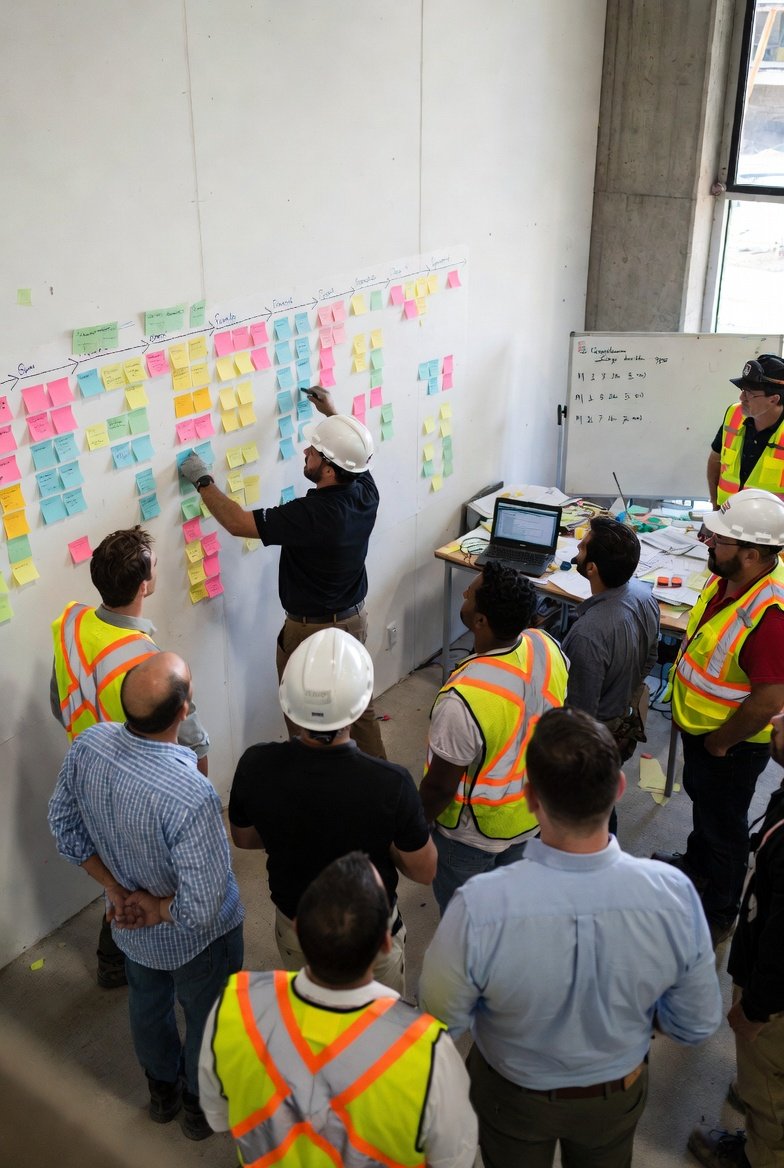
The Pull Planning Revolution
Pull planning has transformed how construction teams plan and execute work. This collaborative approach, where trades work backward from milestones to identify what each party needs and when, creates more realistic and committed schedules than traditional top-down planning. But many teams struggle to integrate pull planning sessions with their construction scheduling software. The sticky notes come off the wall, and then what? Understanding how to bridge collaborative planning with digital schedule management unlocks the full potential of both approaches.
Construction management software and pull planning aren't competing methods—they're complementary. Pull planning creates commitment and coordination; scheduling software maintains the record, enables communication, and tracks execution. When integrated properly, they create a powerful planning system that engages trades while maintaining the visibility and documentation that modern projects require.
Understanding Pull Planning Basics
Before integrating with software, understand pull planning fundamentals:
Working Backward
Pull planning starts with a milestone and works backward to identify what must happen to achieve it. This "pull" from the end date creates logical sequences based on actual dependencies rather than arbitrary start dates. Construction project management software should reflect these pulled sequences.
Trade Commitment
Trades commit to specific work in specific timeframes during pull planning sessions. These commitments are more reliable than assigned tasks because the trades themselves made the promises. Track these commitments in contractor scheduling software.
Constraint Identification
Pull planning reveals constraints—what must be true before an activity can start. Understanding constraints enables proactive resolution. Best construction scheduling software should track and manage constraints.
Collaborative Problem-Solving
When pull planning reveals conflicts or impossible sequences, the team solves them together. This collaborative problem-solving creates better solutions than individual planning. Document solutions in construction scheduling software.
The Integration Challenge
Common integration challenges include:
Translation Gap
Sticky notes on a wall don't automatically become digital schedule data. Someone must translate. Construction management software should make this translation as efficient as possible.
Detail Level Mismatch
Pull planning often creates more detailed activities than traditional schedules. Your construction project management software must handle this increased granularity.
Update Frequency
Pull planning schedules change frequently as work progresses and new information emerges. Contractor scheduling software must support frequent updates without excessive effort.
Commitment Tracking
A key pull planning benefit is commitment tracking—did trades do what they promised? Best construction scheduling software should enable this tracking.
Integration Strategies
Several strategies connect pull planning to scheduling software:
Real-Time Digital Capture
During pull planning sessions, enter activities directly into construction scheduling software displayed on a large screen. The team sees the schedule form in real-time, and translation is immediate.
Post-Session Entry
Take photos of pull planning walls, then enter information into construction management software after the session. This is simpler during sessions but creates a translation delay.
Hybrid Systems
Use physical sticky notes during sessions for tactile collaboration, but transfer to construction project management software before participants leave so they can verify accuracy.
Digital-First Pull Planning
Conduct pull planning using digital tools from the start. Participants interact with contractor scheduling software via tablets or a shared display, creating the schedule directly.
Schedule Structure for Pull Planning
Structure your best construction scheduling software to accommodate pull planning:
Activity-Level Detail
Pull planning creates specific activities—"Install Unit 101 bathroom rough plumbing" rather than "Plumbing rough-in." Your construction scheduling software should handle this specificity.
Predecessor Relationships
Pull planning reveals true dependencies. Enter these in construction management software so schedule updates maintain the logic.
Constraint Documentation
Document identified constraints in construction project management software. Track constraint resolution progress.
Commitment Attribution
Track who committed to each activity. Contractor scheduling software should associate activities with responsible parties.
Running Effective Integrated Sessions
Make pull planning sessions work with software integration:
Preparation
Before sessions, load relevant baseline information into best construction scheduling software. Have milestones, major constraints, and context ready.
Display Setup
If entering directly into software, ensure the display is large enough for all participants to see. Construction scheduling software should have a clean, readable interface.
Facilitation Balance
Balance facilitation of discussion with data entry. Some teams use a separate recorder for construction management software entry while the facilitator manages discussion.
Verification
Before ending sessions, display the entered schedule and verify accuracy with participants. Construction project management software should make this review easy.
Commitment Tracking in Software
One of pull planning's key benefits is commitment tracking:
Planned Percent Complete (PPC)
Track how many committed activities actually completed as planned. This metric reveals reliability. Contractor scheduling software should calculate PPC automatically.
Variance Reasons
When commitments aren't met, document why. Best construction scheduling software should capture variance reasons for analysis.
Reliability Trends
Track commitment reliability over time by trade and by activity type. Construction scheduling software data reveals patterns that inform improvement.
Feedback Loops
Share commitment performance with trades. Construction management software reports support accountability conversations.
Weekly Work Planning Integration
Pull planning typically includes weekly work planning sessions:
Lookahead Updates
Weekly sessions update the near-term schedule. Construction project management software should make weekly updates efficient.
Constraint Review
Review constraints for upcoming activities. Track constraint status in contractor scheduling software.
Make-Ready Process
Identify what's needed to make activities ready to execute. Best construction scheduling software should support make-ready tracking.
Commitment Renewal
Trades recommit to upcoming week activities. Document these renewed commitments in construction scheduling software.
Benefits of Integration
Proper integration delivers multiple benefits:
Single Source of Truth
The construction management software becomes the authoritative schedule record while maintaining pull planning's collaborative benefits.
Communication Reach
Digital schedules reach people who can't attend planning sessions. Construction project management software extends pull planning's communication benefits.
Historical Record
Pull planning walls disappear; contractor scheduling software maintains permanent records of plans and commitments.
Analysis Capabilities
Digital data enables analysis—PPC tracking, variance analysis, trend identification. Best construction scheduling software provides insights sticky notes can't.
Common Integration Mistakes
Avoid these integration mistakes:
Losing Collaboration
Don't let software focus eliminate collaborative discussion. Construction scheduling software supports planning; it doesn't replace human coordination.
Over-Complicating
Keep construction management software simple enough that integration doesn't overwhelm pull planning sessions.
Delayed Entry
Entering data days after sessions loses accuracy and momentum. Integrate construction project management software entry with sessions.
Ignoring Commitments
Pull planning's power comes from commitment tracking. Use contractor scheduling software to maintain this accountability.
Conclusion
Pull planning and best construction scheduling software are more powerful together than either is alone. Pull planning creates committed, realistic plans through collaboration. Scheduling software documents, communicates, and tracks these plans.
Integrate thoughtfully: choose an approach that works for your team, structure your construction scheduling software to accommodate pull planning detail, and maintain the commitment tracking that makes pull planning valuable.
The construction industry increasingly embraces lean methods like pull planning. Contractors who integrate these methods with construction management software gain advantages in plan reliability, trade coordination, and project outcomes.